Text Classification
Laya
Safetensors
GGUF
English
unsloth
system-one
typed-decisions
decision-model
voice
turn-detection
interruption
feature-extraction
Instructions to use Borcherding/voice-decisions-laya-v4 with libraries, inference providers, notebooks, and local apps. Follow these links to get started.
- Libraries
- Laya
How to use Borcherding/voice-decisions-laya-v4 with Laya:
# No code snippets available yet for this library. # To use this model, check the repository files and the library's documentation. # Want to help? PRs adding snippets are welcome at: # https://github.com/huggingface/huggingface.js
- Notebooks
- Google Colab
- Kaggle
- Local Apps Settings
- llama.cpp
How to use Borcherding/voice-decisions-laya-v4 with llama.cpp:
Install (macOS, Linux)
curl -LsSf https://llama.app/install.sh | sh # Start a local OpenAI-compatible server with a web UI: llama serve -hf Borcherding/voice-decisions-laya-v4:Q8_0 # Run inference directly in the terminal: llama cli -hf Borcherding/voice-decisions-laya-v4:Q8_0
Install from WinGet (Windows)
winget install llama.cpp # Start a local OpenAI-compatible server with a web UI: llama serve -hf Borcherding/voice-decisions-laya-v4:Q8_0 # Run inference directly in the terminal: llama cli -hf Borcherding/voice-decisions-laya-v4:Q8_0
Build from source code
git clone https://github.com/ggml-org/llama.cpp.git cd llama.cpp cmake -B build cmake --build build -j --target llama-app # Start a local OpenAI-compatible server with a web UI: ./build/bin/llama serve -hf Borcherding/voice-decisions-laya-v4:Q8_0 # Run inference directly in the terminal: ./build/bin/llama cli -hf Borcherding/voice-decisions-laya-v4:Q8_0
Use Docker
docker model run hf.co/Borcherding/voice-decisions-laya-v4:Q8_0
- Llama new
- LM Studio
- Jan
- Ollama
How to use Borcherding/voice-decisions-laya-v4 with Ollama:
ollama run hf.co/Borcherding/voice-decisions-laya-v4:Q8_0
- Unsloth Desktop
- Docker Model Runner
How to use Borcherding/voice-decisions-laya-v4 with Docker Model Runner:
docker model run hf.co/Borcherding/voice-decisions-laya-v4:Q8_0
- Lemonade
How to use Borcherding/voice-decisions-laya-v4 with Lemonade:
Pull the model
# Download Lemonade from https://lemonade-server.ai/ lemonade pull Borcherding/voice-decisions-laya-v4:Q8_0
Run and chat with the model
lemonade run user.voice-decisions-laya-v4-Q8_0
List all available models
lemonade list
- Atomic Chat
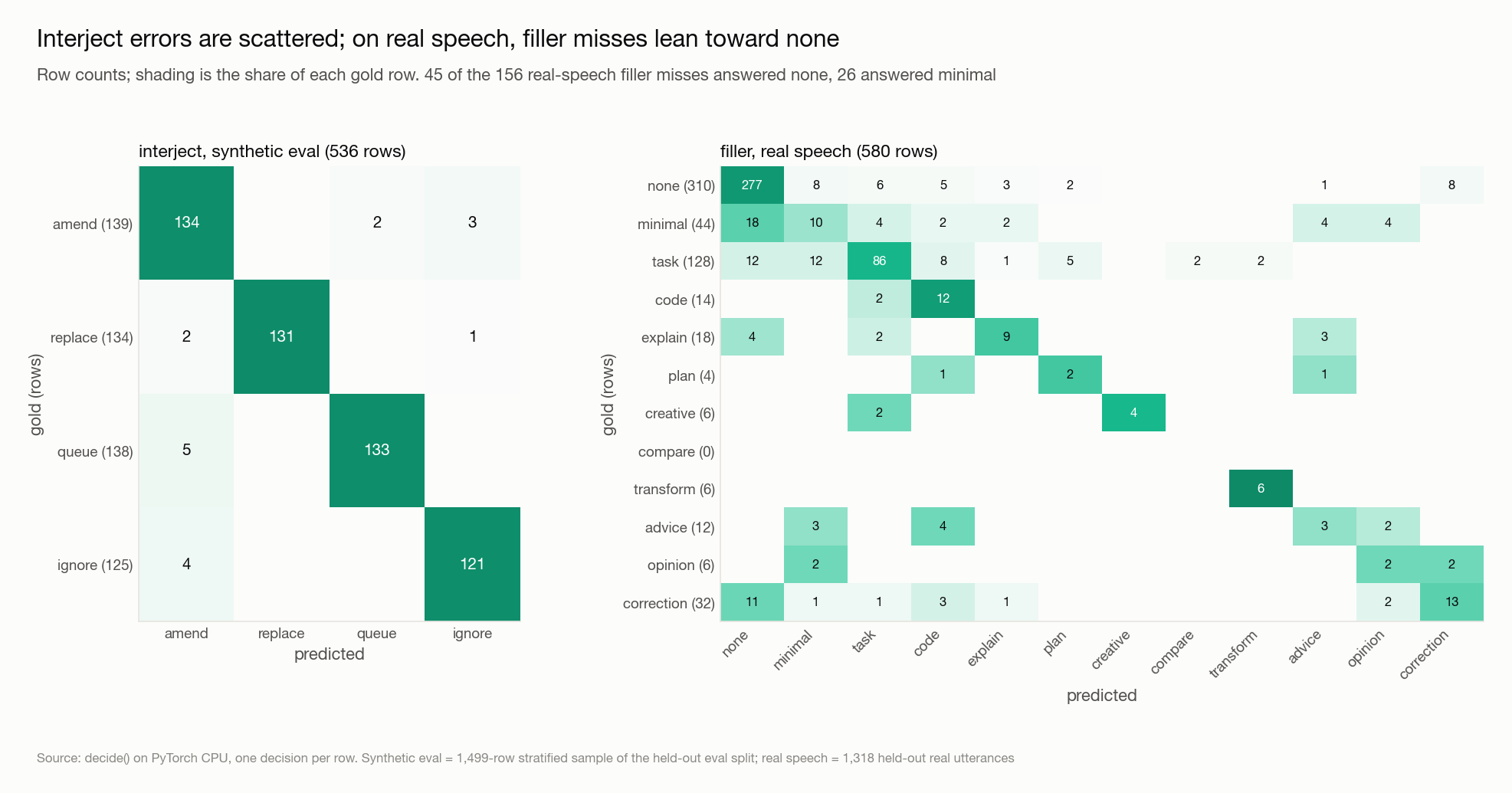
Download charts/confusion-matrices.png from Borcherding/voice-decisions-laya-v4: direct link, hf CLI and curl.
- Browser
- Download file 157 kB
-
https://huggingface.co/Borcherding/voice-decisions-laya-v4/resolve/main/charts/confusion-matrices.png
- Command line
-
hf download hf://Borcherding/voice-decisions-laya-v4/charts/confusion-matrices.png
-
curl -L -o confusion-matrices.png https://huggingface.co/Borcherding/voice-decisions-laya-v4/resolve/main/charts/confusion-matrices.png
157 kB

- Xet hash:
- db119473d0112eb4cd5ebd551b2b1d5dd2276736bb48e541dc14c20c4bacb402
- Size of remote file:
- 157 kB
- SHA256:
- 56ef030ebf6061796382e0e04c3b6397b982d5b0a94babc5faa71dd75a700407
·
Xet efficiently stores Large Files inside Git, intelligently splitting files into unique chunks and accelerating uploads and downloads. More info.