

ONNX Inference Error

I tried to run the models(2X, 3X, 4X) inference with an image measuring 860x863 from my computer in .onnx format with onnxruntime_directml 1.20.1, and when I did so, the following error appeared: "Error in operation ‘Upscaling process’: [ONNXRuntimeError] : 2 : INVALID_ARGUMENT : Got invalid dimensions for input: args_0 for the following indices
index: 2 Got: 863 Expected: 128
index: 3 Got: 860 Expected: 128
Please fix either the inputs/outputs or the model."
Do the models have measurement restrictions on the input image? As I can see in the export-onnx-model.ipynb file, the measurements you exported to .onnx format are not dynamic but static. Could you correct that and publish it in the HuggingFace repositories of UltraZoom 2x, 3x and 4x?
Ah nice catch @binatheis , I think that has something to do with the way I exported the ONNX version. See the last cell in this notebook https://github.com/andrewdalpino/UltraZoom/blob/master/export-model.ipynb. I believe there is a way to specify that the last two dimensions of the input tensor are dynamic. I'll give this a look when I have free time.
Did you try the PyTorch version? Did that work ok?
Ah nice catch @binatheis , I think that has something to do with the way I exported the ONNX version. See the last cell in this notebook https://github.com/andrewdalpino/UltraZoom/blob/master/export-model.ipynb. I believe there is a way to specify that the last two dimensions of the input tensor are dynamic. I'll give this a look when I have free time.
Did you try the PyTorch version? Did that work ok?
No, I haven't run the model with PyTorch, but I assume everything would work fine with it. The problem is with .onnx, as you know, it's a more accessible and easier format to run, since the dependencies are minimal. I hope you manage to fix it.
Ok @binatheis , try the latest ONNX model I just uploaded and let me know if that fixed it.
I confirm that everything is working now, thank you very much, Andrew. I hope you continue to publish similar content in the future, especially in .onnx format for consumer computers.
Sweet, I'm actually working on a version 2/fine-tune of Ultra Zoom currently, stay tuned!
Hey @binatheis , I just released a new version of this model that integrated control modules into the architecture, allowing you to independently adjust the amount of deblurring, denoising, and deartifacting. I'd love to hear your feedback!
Hey @binatheis , I just released a new version of this model that integrated control modules into the architecture, allowing you to independently adjust the amount of deblurring, denoising, and deartifacting. I'd love to hear your feedback!
Hi Andrew, yes. Just yesterday I was checking Github and saw that you had updated it. I already downloaded it from HugginFace repository, but I haven't tried it yet. I think that starting Monday I'll dedicate myself to testing it and finishing up the product I'll be launching with them. Could you explain those three parameters to me in more detail, what they do, and how they could be used in Python using the .onnx formats with onnxruntime?
Sure, with the new "Ctrl" models the input is not only a low-resolution image x of size [b, 3, h, w] but also a control vector c of size [b, 3]. The 3 features of the control vector are gaussian_blur, gaussian_noise, and jpeg_compression. They are values between 0 and 1 and are interpreted as the level of degradation of that kind assumed to be present in the input image. So if you have a noisy camera, a meme that's been shared on social media 100 times, or an AI-generated image - you should be able to fine-tune the model at inference time to get the most out of it based on what you know about the source. Under the hood, the control vector gets injected into control modules within the encoder network steering the activations. This is how you'd do it using the ultrazoom library, with ONNX you'd just have to instantiate and input the control vector along with the image, the output is still the upscaled image.
import torch

from torchvision.io import decode_image, ImageReadMode
from torchvision.transforms.v2 import ToDtype, ToPILImage

from ultrazoom.model import UltraZoom
from ultrazoom.control import ControlVector


model_name = "andrewdalpino/UltraZoom-2X-Ctrl"
image_path = "./dataset/bird.png"

model = UltraZoom.from_pretrained(model_name)

image_to_tensor = ToDtype(torch.float32, scale=True)
tensor_to_pil = ToPILImage()

image = decode_image(image_path, mode=ImageReadMode.RGB)

x = image_to_tensor(image).unsqueeze(0)

c = ControlVector(
    gaussian_blur=0.5,      # Higher values indicate more degradation
    gaussian_noise=0.6,     # which increases the strength of the
    jpeg_compression=0.7    # enhancement.
).to_tensor()

y_pred = model.upscale(x, c)

pil_image = tensor_to_pil(y_pred.squeeze(0))

pil_image.show()
Sure, with the new "Ctrl" models the input is not only a low-resolution image
xof size [b, 3, h, w] but also a control vectorcof size [b, 3]. The 3 features of the control vector aregaussian_blur,gaussian_noise, andjpeg_compression. They are values between 0 and 1 and are interpreted as the level of degradation of that kind assumed to be present in the input image. So if you have a noisy camera, a meme that's been shared on social media 100 times, or an AI-generated image - you should be able to fine-tune the model at inference time to get the most out of it based on what you know about the source. Under the hood, the control vector gets injected into control modules within the encoder network steering the activations. This is how you'd do it using theultrazoomlibrary, with ONNX you'd just have to instantiate and input the control vector along with the image, the output is still the upscaled image.import torch from torchvision.io import decode_image, ImageReadMode from torchvision.transforms.v2 import ToDtype, ToPILImage from ultrazoom.model import UltraZoom from ultrazoom.control import ControlVector model_name = "andrewdalpino/UltraZoom-2X-Ctrl" image_path = "./dataset/bird.png" model = UltraZoom.from_pretrained(model_name) image_to_tensor = ToDtype(torch.float32, scale=True) tensor_to_pil = ToPILImage() image = decode_image(image_path, mode=ImageReadMode.RGB) x = image_to_tensor(image).unsqueeze(0) c = ControlVector( gaussian_blur=0.5, # Higher values indicate more degradation gaussian_noise=0.6, # which increases the strength of the jpeg_compression=0.7 # enhancement. ).to_tensor() y_pred = model.upscale(x, c) pil_image = tensor_to_pil(y_pred.squeeze(0)) pil_image.show()
I understand a little more now. The new feature serves to better guide image generation. It's as if we were exposing certain parameters that the model will use to improve generation, taking into account that not all input images are of the same quality. I'm going to try to test its use from onnxruntime to see if it works and what effects it would have on an image. It would be interesting if you could provide visual examples of how playing with the parameters affects the image and what abstraction needs to be done on an input image to know what value to set for each parameter.
Yup, that's exactly right @binatheis . It's like have three knobs that you can adjust rather than letting the model make assumptions about how much degradation exists in the image.
Absolutely, I'll work on some examples and get back to you.
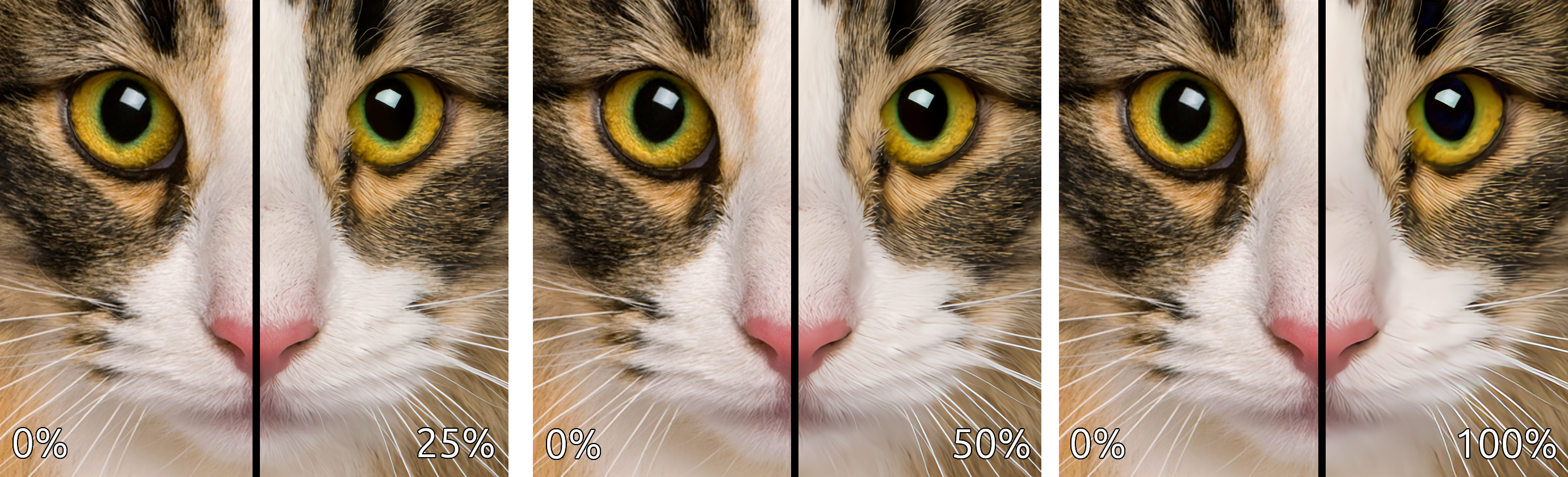
Ok here we go
This comparison demonstrates the strength of the enhancements (deblurring, denoising, and deartifacting) applied to the upscaled image.
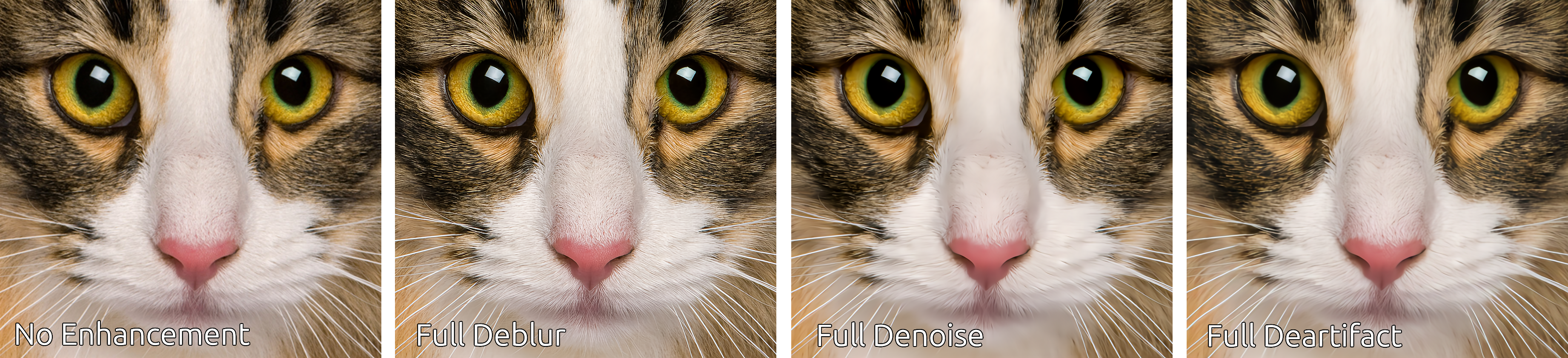
This comparison demonstrates the individual enhancements applied in isolation.
Ok here we go
This comparison demonstrates the strength of the enhancements (deblurring, denoising, and deartifacting) applied to the upscaled image.
This comparison demonstrates the individual enhancements applied in isolation.
Perfect, now I understand perfectly. I'll start in a few minutes and then let you know how my experiment turned out.
Ok here we go
This comparison demonstrates the strength of the enhancements (deblurring, denoising, and deartifacting) applied to the upscaled image.
This comparison demonstrates the individual enhancements applied in isolation.
Andrew, I've tried the new UltraZoom-2X-Ctrl model and I can confirm that the controls work perfectly in .onnx with onnxruntime in Python. I didn't need to use the Ultrazoom library that you have in pypi, as numpy was sufficient since we were using onnx.
I hope to continue hearing about your new projects. I have several in mind and would love to have a partner for one of them, as it involves knowledge of training, etc. Although it would be more like a bootstrapped startup idea.
Awesome, glad to hear it works using ONNX runtime in Python. Let's keep in touch! Do you have Telegram? If so, you can find me in https://t.me/RubixML.