

Qwen3.8-pi
Collection
Qwen3.8 models fine-tuned for the Pi coding harness • 3 items • Updated • 4
Quickstart · Benchmarks · Advanced · License
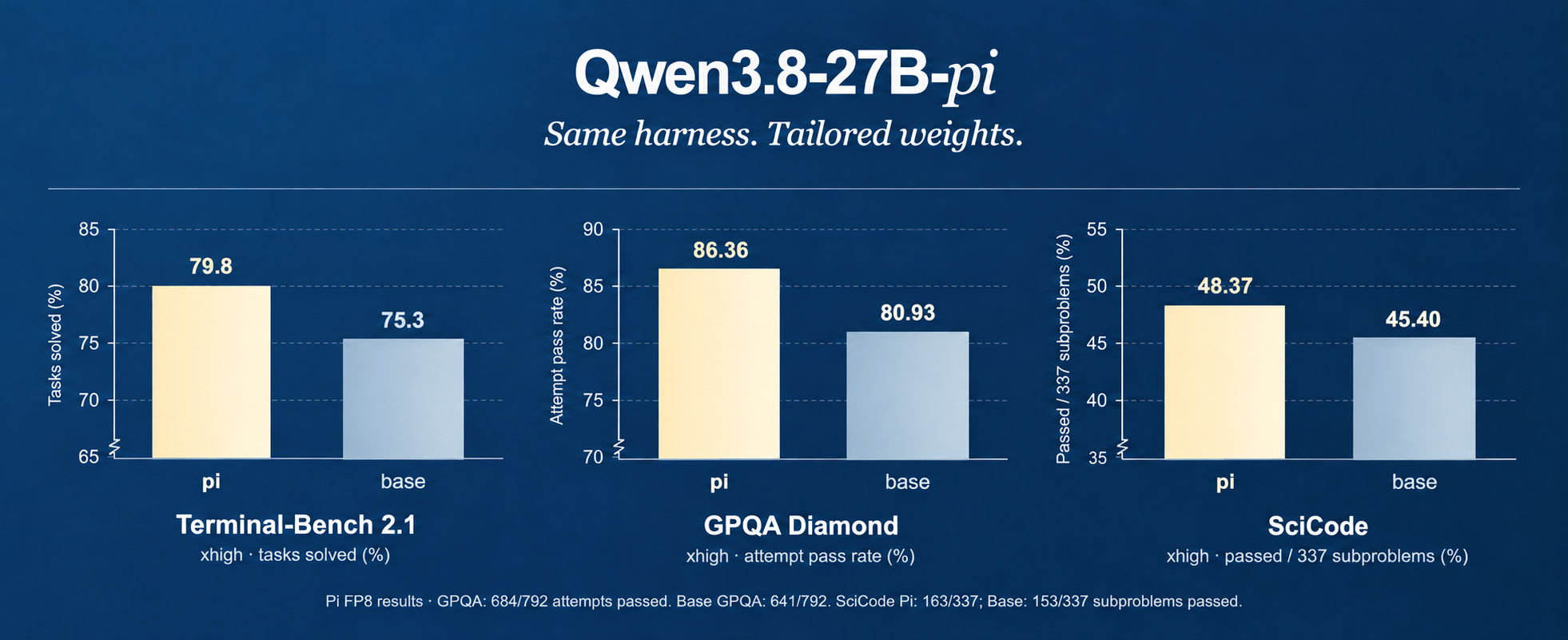
Qwen3.8-27B-pi builds on Qwen3.8-27B for coding work in the Pi agent harness. It is tailored to the loop of reading a repository, editing files, running tools, and responding to their feedback. The aim is more completed work with less generated text, while retaining the base model's familiar interface.
Fine-tuned for the Pi agent harness, the model is designed to work through coding tasks as an iterative process: inspect the code, make a change, check the result, and use tool feedback to guide the next step. Adjustable reasoning effort lets you balance responsiveness with deeper problem-solving, from focused edits to more involved debugging and implementation work.
Pi’s development followed a staged process, from trajectory curation and supervised fine-tuning to reinforcement learning and checkpoint evaluation. Each stage was assessed against the same practical goal: helping the model complete useful work in Pi while managing the resources it spends. Checkpoints were compared using actual agent outcomes alongside generated tokens, tool calls, and completion time—not training loss alone.
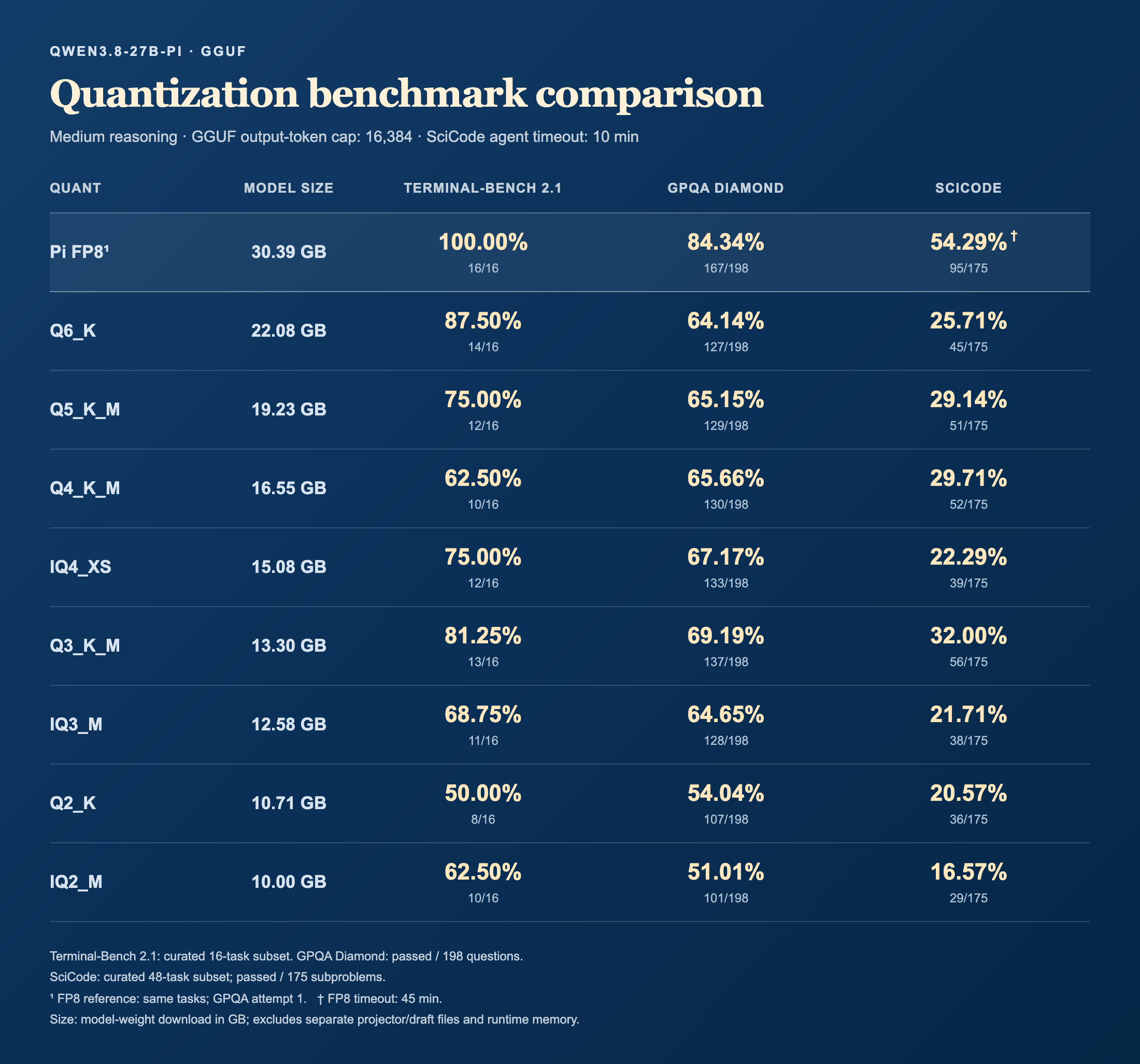
Choose from a range of GGUF sizes to fit your hardware, including compact IQ (“importance-aware”) options designed to preserve quality at lower memory use. Calibration on complete Pi coding sessions helps guide compression toward the parts of the model most important to those workflows.
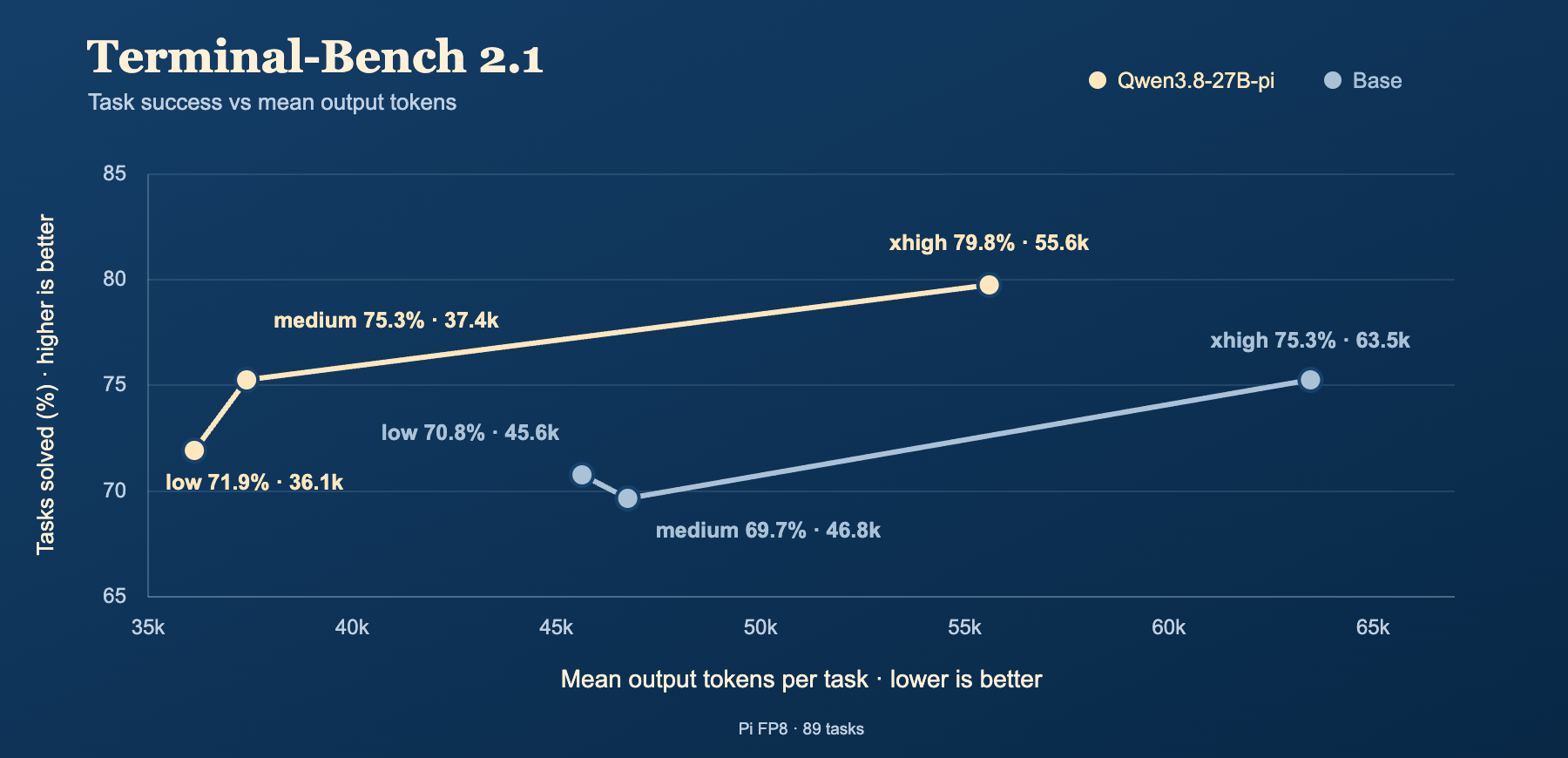
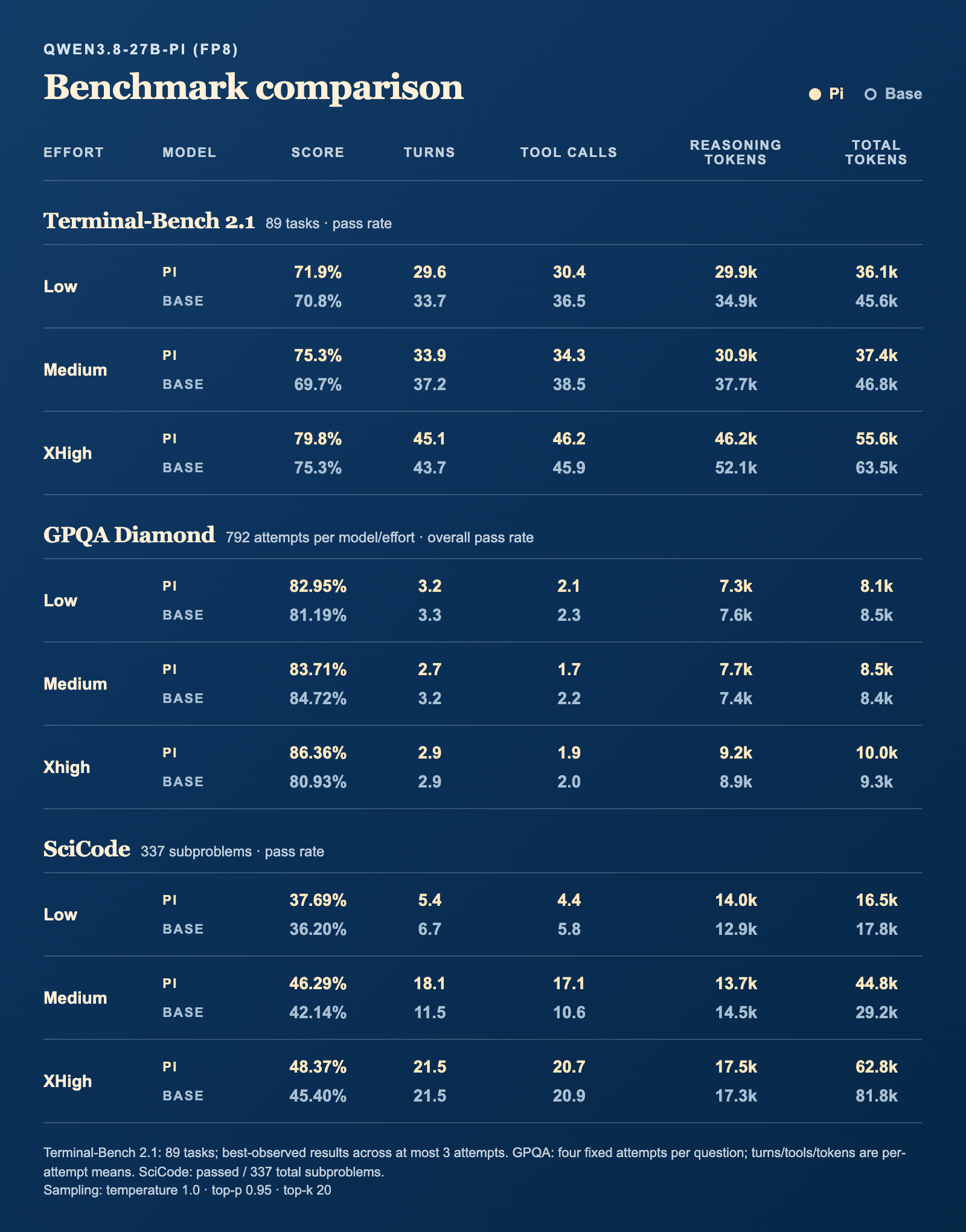
Curated Pi sessions and reinforcement learning emphasized completed, checked coding work. Pi shows a steadier rise in completion from low to xhigh than Base, with fewer output tokens at every matched effort level. In these selected results, Pi’s medium setting matches Base’s xhigh completion rate with about 41% fewer output tokens.
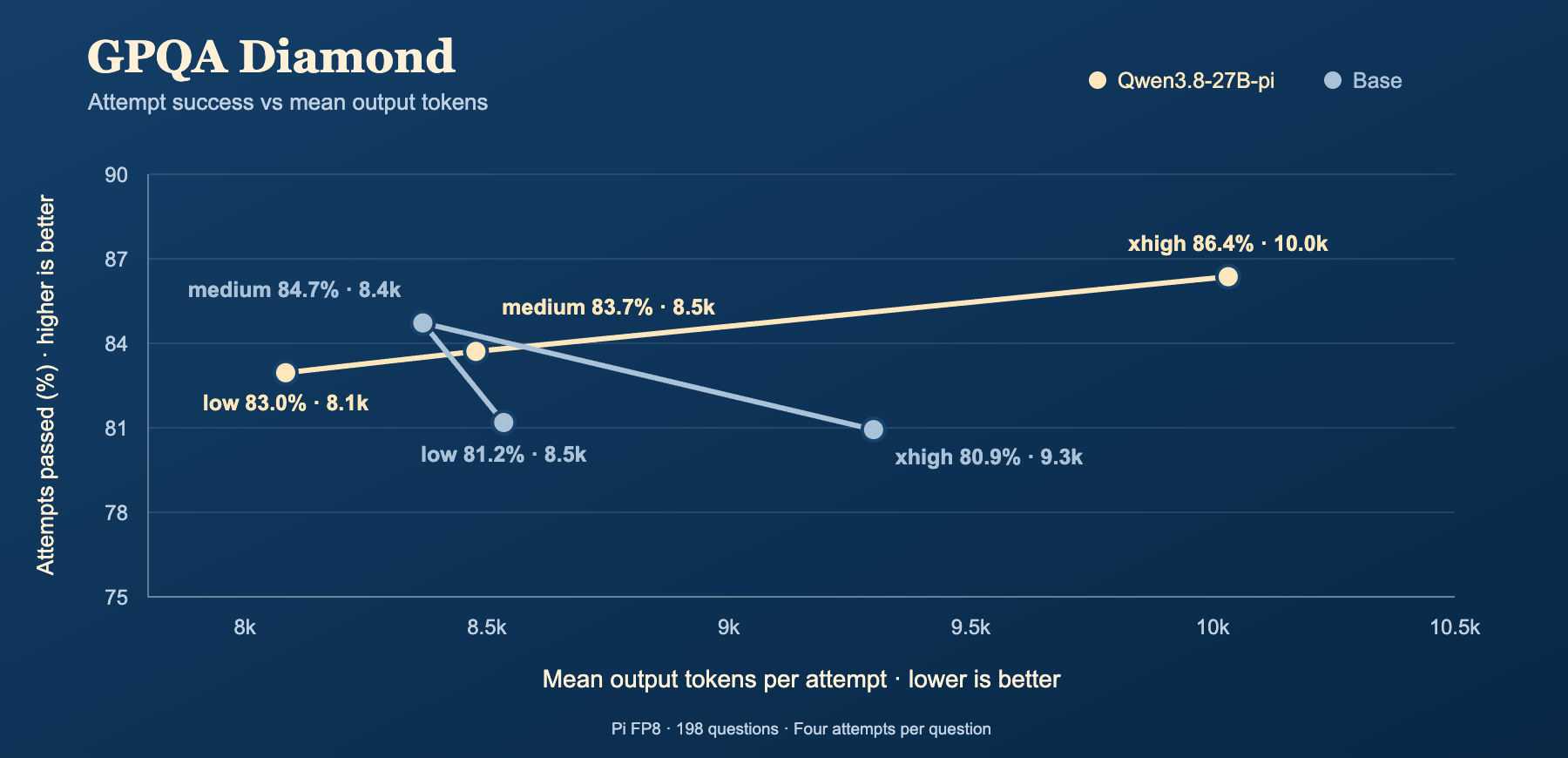
Pi’s RL stage encouraged economical low/medium reasoning while keeping xhigh focused on correctness. The graph shows a smoother rise in Pi’s attempt success as effort increases, while Base peaks at medium. Pi achieves the highest xhigh score, but Base retains the medium-effort edge.
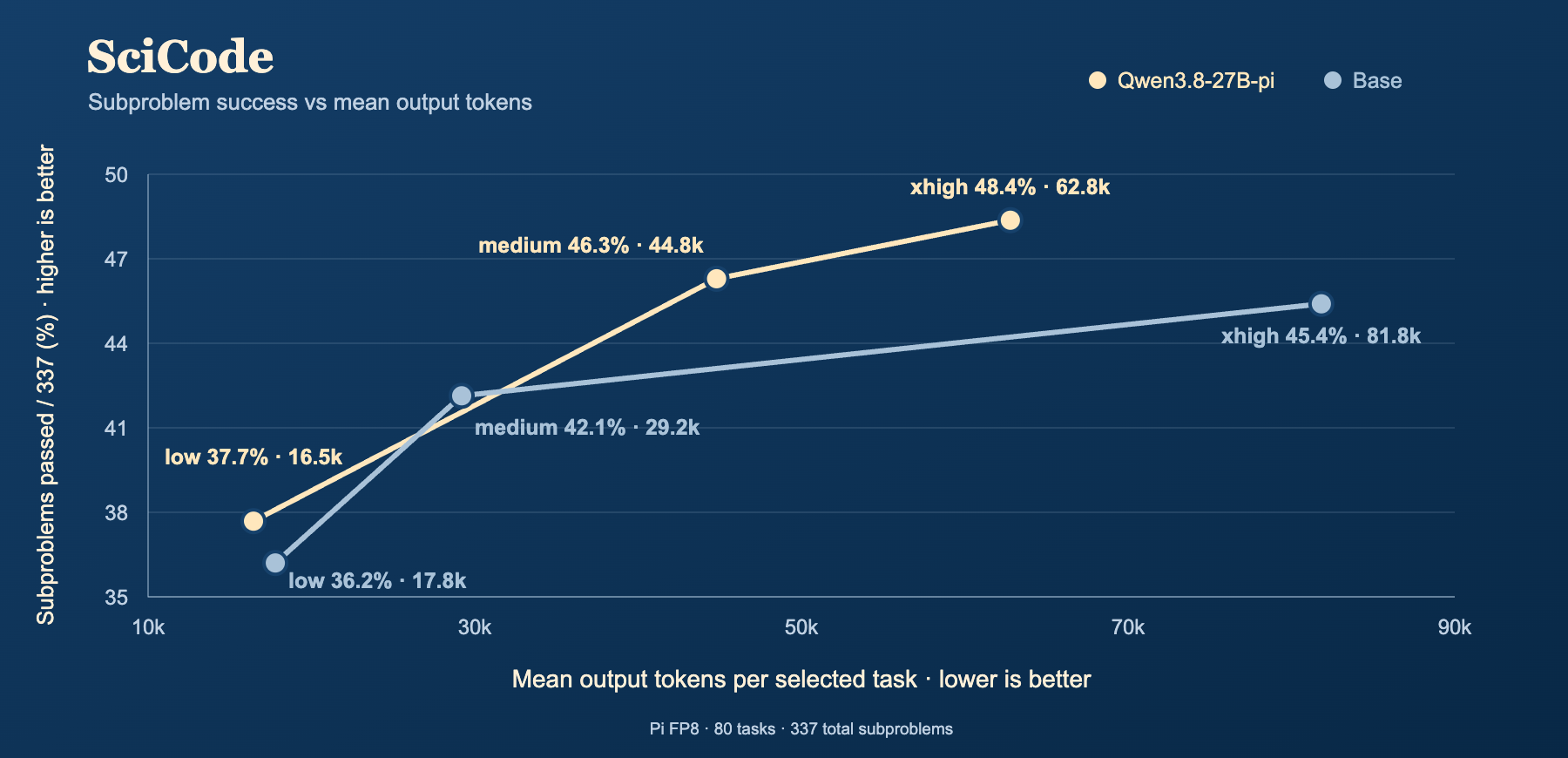
Pi’s development prioritized successful solutions alongside resource use—not shorter responses alone. Both models improve with higher effort, but Pi solves more subproblems at every level. At xhigh, Pi scores higher with about 23% fewer output tokens; at medium, its higher score requires more tokens.
Download the Q4_K_M model, vision projector, and compact Q4_0 MTP head. These files are used by both quickstarts below.
hf download bytkim/Qwen3.8-27B-pi-GGUF \
  --include "Qwen3.8-27B-pi-Q4_K_M.gguf" \
            "mmproj-Qwen3.8-27B-pi-BF16.gguf" \
            "mtp/mtp-Qwen3.8-27B-pi-Q4_0.gguf" \
  --local-dir models
llama-server \
  --model models/Qwen3.8-27B-pi-Q4_K_M.gguf \
  --mmproj models/mmproj-Qwen3.8-27B-pi-BF16.gguf \
  --model-draft models/mtp/mtp-Qwen3.8-27B-pi-Q4_0.gguf \
  --spec-type draft-mtp \
  --spec-draft-n-max 3 \
  --ctx-size 262144 \
  --parallel 1 \
  --temp 1.0 \
  --top-k 20 \
  --min-p 0.0
Sampling is configured explicitly where llama.cpp’s defaults differ from Qwen’s recommended thinking settings. Unlike vLLM, llama.cpp does not automatically load this repository’s
generation_config.json; API requests can override these server defaults.
Choose your MTP head: the quickstart uses Q4_0. To use BF16 or Q8_0 instead, download that head and change --model-draft.
| MTP head | Download size | Draft-3 | Draft-6 | Draft-8 |
|---|---|---|---|---|
mtp-Qwen3.8-27B-pi-BF16.gguf |
5.95 GB | +24–35% | +29–39% | +13–32% |
mtp-Qwen3.8-27B-pi-Q8_0.gguf |
3.16 GB | +48–57% | +52–66% | +42–52% |
mtp-Qwen3.8-27B-pi-Q4_0.gguf |
2.01 GB | +50–58% | +60–72% | +48–55% |
Decode speedup vs. no MTP on a 3-task subset using Q4_K_M, RTX PRO 6000, 262K context, and parallel 1.
The MTP head does not need to match your main model’s quantization. To run without MTP, omit --model-draft, --spec-type, and --spec-draft-n-max.
For direct responses without a thinking section, use this command instead:
llama-server \
  --model models/Qwen3.8-27B-pi-Q4_K_M.gguf \
  --mmproj models/mmproj-Qwen3.8-27B-pi-BF16.gguf \
  --model-draft models/mtp/mtp-Qwen3.8-27B-pi-Q4_0.gguf \
  --spec-type draft-mtp \
  --spec-draft-n-max 3 \
  --ctx-size 262144 \
  --parallel 1 \
  --chat-template-kwargs '{"enable_thinking":false}' \
  --temp 0.7 \
  --top-p 0.8 \
  --top-k 20 \
  --min-p 0.0 \
  --presence-penalty 1.5
This command disables thinking by default and applies Qwen’s recommended non-thinking sampling settings. Turning thinking off alone does not change sampling.
Download one mirrored DFlash2 companion before starting the server. This command downloads the 1.14 GB Q4_K_M draft used below, without downloading the other variants.
hf download bytkim/Qwen3.8-27B-pi-GGUF \
  --include "dflash2/Qwen3.8-27B-DFlash2-Q4_K_M.gguf" \
  --local-dir models
For Q8_0 or BF16, replace the filename in both the download command and --model-draft. Download your main model separately as shown in Quickstart.
DFlash2 companion weights are mirrored unchanged from Inco AI, with attribution and license included in
dflash2/.
llama-server \
  --model models/Qwen3.8-27B-pi-Q4_K_M.gguf \
  --model-draft models/dflash2/Qwen3.8-27B-DFlash2-Q4_K_M.gguf \
  --spec-type draft-dflash \
  --spec-draft-n-max 7 \
  --ctx-size 262144 \
  --parallel 1 \
  --temp 1.0 \
  --top-p 0.95 \
  --top-k 20 \
  --min-p 0.0
Choose your DFlash2 companion: substitute its path in --model-draft.
| DFlash2 companion | Download size | Option |
|---|---|---|
Qwen3.8-27B-DFlash2-BF16.gguf |
3.86 GB | Original · unquantized |
Qwen3.8-27B-DFlash2-Q8_0.gguf |
2.06 GB | Higher precision |
Qwen3.8-27B-DFlash2-Q4_K_M.gguf |
1.14 GB | Default · smallest download |
The DFlash2 companion does not need to match your main model’s quantization. Use it instead of the MTP companion, with a recent llama.cpp build that supports DFlash2. Generation speed and available context depend on your hardware and workload.
llama.cpp supports f32, f16, bf16, q8_0, q5_0, q5_1, q4_0, q4_1, and iq4_nl as cache-format options.
Add these options to either Quickstart command for Q8 cache with Flash Attention:
--flash-attn on \
--cache-type-k q8_0 \
--cache-type-v q8_0
Flash Attention accepts on, off, or auto (default). Quantized V cache requires Flash Attention; auto enables it when quantized V is requested, but the backend must support the combination. Flash Attention is an attention implementation, not DFlash2 speculative decoding.
Smaller cache formats reduce memory use, leaving more room for longer conversations. K and V can use different formats; the estimates below use the same format for both at 256K context (--ctx-size 262144 --parallel 1).
| Cache format | K (GiB) | V (GiB) | Total (GiB) |
|---|---|---|---|
f32 |
16 | 16 | 32 |
f16 / bf16 |
8 | 8 | 16 |
q8_0 |
4.25 | 4.25 | 8.50 |
q5_1 |
3 | 3 | 6 |
q5_0 |
2.75 | 2.75 | 5.50 |
q4_1 |
2.50 | 2.50 | 5 |
q4_0 / iq4_nl |
2.25 | 2.25 | 4.50 |
Start with f16, or try q8_0 to save memory. Shorter contexts use proportionally less cache; these estimates exclude model weights and other runtime memory. Check quality when using smaller formats.
Qwen3.8-27B-pi is fine-tuned from Qwen3.8-27B, whose base-model weights are licensed under the Apache License 2.0. See LICENSE for the full terms and NOTICE for upstream attribution and Pi modification details. Mirrored DFlash2 companions retain their license and provenance in dflash2/.
Built on Qwen3.8-27B from the Qwen team and adapted for the Pi agent harness. Thanks to the open-source training, inference, quantization, and evaluation projects—and dataset contributors—that supported its development.
2-bit
3-bit
4-bit
5-bit
6-bit
8-bit
16-bit
Base model
Qwen/Qwen3.8-27B