


Hy-SimulMT
Collection
Hy Simultaneous Interpretation Model • 6 items • Updated • 14
English | 简体中文


A Low-Latency, High-Quality Model for Real-Time Simultaneous Translation


Hy-SimulMT is a real-time simultaneous translation model developed by Tencent Hunyuan, supporting bidirectional speech-to-speech translation between Chinese and English. It continuously receives incoming audio and translates as the speaker talks, producing both translated text and speech. With real-time voice cloning, it preserves the speaker's vocal characteristics while conveying the message accurately.
Designed for live communication settings such as meetings, speeches, and interviews, Hy-SimulMT aims to convey information accurately while reducing the disruption that waiting introduces into a conversation. To evaluate this balance between translation quality and response speed, we combine public benchmarks, real-world audio, and comparisons with professional simultaneous interpreters.
In our RealSI long-form audio evaluation, Hy-SimulMT achieved a StreamLAAL of approximately 3 seconds, the lowest among the systems shown in the comparison. Its GEMBA score exceeded those of the compared open-source models and four of the five commercial APIs.
The GitHub repository provides the SimulInfer inference service and SimulTrain training tools. Speech output and voice cloning require a configured TTS service. You can also try Hy-SimulMT in the Hy Translate App.
Scan to download the Hy Translate App
| Android | iOS |
|---|---|
 |
 |
The challenge of simultaneous translation is not simply to convert one language into another, but to understand and formulate a translation while the speaker is still talking. Waiting for more information often helps resolve the complete meaning, but also makes listeners wait longer. Speaking earlier, on the other hand, places greater demands on incremental understanding and translation generation.
Hy-SimulMT focuses on this balance between quality and latency: translating as a continuous audio stream arrives, so that listeners receive information promptly while the original meaning is preserved as accurately as possible.
We compared Hy-SimulMT with several open-source simultaneous translation models and commercial APIs on the open-source RealSI long-form audio benchmark. The results show that Hy-SimulMT achieves competitive translation quality at lower latency.

The horizontal axis shows StreamLAAL, a measure of streaming translation lag, in seconds (lower is better); the vertical axis shows the GEMBA translation quality score (higher is better). StreamLAAL is not the same as the time to first speech output.
In this evaluation, Hy-SimulMT achieved a StreamLAAL of approximately 3 seconds, the lowest among the systems shown. Its GEMBA score exceeded those of the compared open-source models and four of the five commercial APIs.
These results suggest that lower latency does not necessarily require a substantial sacrifice in translation quality. Hy-SimulMT offers a more timely way to access cross-language information during extended speeches, interviews, and meetings.
In addition to long-form audio, we evaluated the model on four public short-form audio benchmarks—FLEURS, CoVoST2, ACL6060, and RealSI-Sentence—to examine translation performance under different data conditions.
| API / Model | FLEURS | CoVoST2 | ACL6060 | RealSI-Sentence |
|---|---|---|---|---|
| Qwen3.8-LiveTranslate | 88.4 | 82.1 | 80.5 | 84.4 |
| Hy-SimulMT | 90.3 | 75.5 | 81.2 | 84.7 |
| Gemini3.5-LiveTranslate | 92.4 | 74.4 | 82.6 | 82.2 |
| Confucius4 R2T2 → T3PO | 89.4 | 76.8 | 76.1 | 77.7 |
| Seed-LiveInterpret2.0 | 85.8 | 67.7 | 74.8 | 80.0 |
| SimulS2ST-Omni | 78.6 | 66.6 | 73.1 | 77.4 |
| GPT-Realtime-Translate | 77.7 | 50.8 | 76.4 | 76.7 |
| XunFei-Simult-Interpretation | 73.4 | 57.0 | 57.5 | 70.9 |
| SeamlessStreaming | 72.8 | 60.9 | 49.8 | 56.9 |
Higher scores are better. The entire Hy-SimulMT row is bolded to highlight our model; other bolded values indicate the highest score in the corresponding column.
Hy-SimulMT scored higher than the other open-source models in the table on FLEURS, ACL6060, and RealSI-Sentence. Its 84.7 on RealSI-Sentence was the highest among all listed systems. Results across these benchmarks also help us identify the model's strengths and areas for improvement.
To further examine performance on real-world content, we collected 18 Chinese and English audio recordings newly appearing online from September 2026 onward, each approximately 6 minutes long. The recordings cover speeches, interviews, and meetings across ten domains: software and AI, medicine, manufacturing and energy, natural sciences, agriculture and food, business management, law, education, culture and tourism, and sports and daily life.
Alongside Hy-SimulMT, we invited six interpreters with years of practical simultaneous interpreting experience to interpret these recordings. Three held CATTI Level 1 interpreting certificates, and three held CATTI Level 2 interpreting certificates. For each certification level, the highest score among the three interpreters was used for comparison.
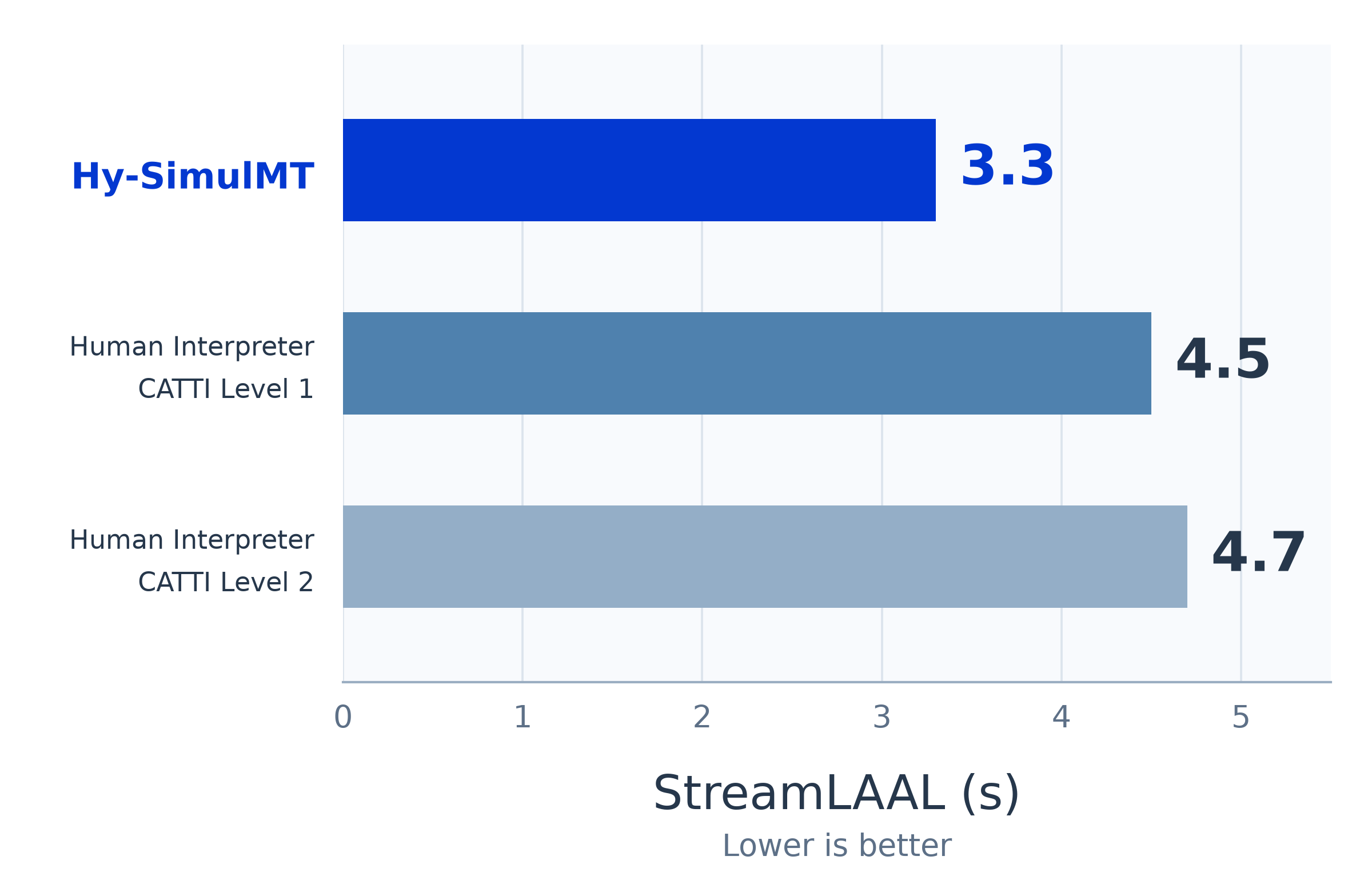
As this small-scale capability assessment shows, Hy-SimulMT achieves translation quality on par with expert human simultaneous interpreters, while often responding faster (with lower latency).
These findings apply only to the samples, participating interpreters, and evaluation settings used in this test. They do not constitute a comprehensive assessment of speech quality, voice similarity, or other dimensions.
Beyond the quantitative results, the following four videos illustrate how Hy-SimulMT and human interpreters compare in information delivery, response timing, and phrasing in the target language.
Click the fullscreen button in each player, or select Watch larger to open the full-size video.
|
Comparison Example 1 |
Comparison Example 2 |
|
Comparison Example 3 |
Comparison Example 4 |
Cross-language communication conveys not only information, but also the characteristics of a speaker's voice. Hy-SimulMT supports real-time voice cloning, preserving the original speaker's vocal characteristics while generating speech in the target language.
The English-to-Chinese demo features three speakers. The model presents their distinct vocal characteristics, making it easier for listeners to tell who is speaking while following the translation.
The following two videos are offline replays provided for demonstration; their playback timing should not be interpreted as a live latency measurement.
Watch the English → Chinese demo (1 minute 39 seconds)
Watch the Chinese → English demo (35 seconds)
From cross-language speeches to multi-speaker interviews, this capability opens up possibilities for more natural and more readily identifiable spoken communication.
Simultaneous translation ultimately serves real communication. Beyond benchmark scores, we value professional interpreters' feedback on information delivery, response timing, and how natural the translated speech sounds.
The following statements are full English translations of the original Chinese remarks.
Wang Weiwei, Vice Dean of the School of Interpreting and Translation Studies at Guangdong University of Foreign Studies, said: "In real-world evaluations, Tencent Hunyuan's simultaneous translation produces natural-sounding target-language speech and accurately conveys the main information in ordinary statements. To control latency, the system starts speaking first and makes corrections afterward; these corrections sound similar to an interpreter's self-corrections. This marks a new milestone in China's AI simultaneous interpreting capabilities (automatic speech translation, AST). As the technology continues to be refined, AI simultaneous interpreting is moving from 'assisting understanding' toward 'usable communication' in low-risk settings, providing important technical support for a new paradigm of human–machine collaboration in translation."
Professor Zhong Weihe, former President of Guangdong University of Foreign Studies, Rector of Macao Millennium College in Macao, China, former Executive Vice President of the Translators Association of China, and Chair of its Interpreting Committee, said: "Simultaneous interpreting is one of the most challenging areas of language services. Systematic evaluations show that Tencent Hunyuan's simultaneous translation model demonstrates notable capabilities in speech recognition stability, simultaneous translation response speed, and the quality of spoken translation output. These research and development achievements reflect the continued progress of AI simultaneous interpreting technology and provide strong technical support for bringing machine simultaneous interpreting into real-world settings."
This feedback also points to a clear application path: helping AI simultaneous translation become useful first in appropriate low-risk settings, while continuing to improve through human–machine collaboration. Professional interpreters remain important in scenarios requiring strict accountability, expert review, or high-stakes decisions.
| Model | Description | Download |
|---|---|---|
| Hy-SimulMT-30B-A3B | Hunyuan simultaneous translation model, translation-only output | Model |
| Hy-SimulMT-30B-A3B-FP8 | Hunyuan simultaneous translation model, translation-only output, FP8 quantization | Model |
| Hy-SimulMT-30B-A3B-GGUF | Hunyuan simultaneous translation model, translation-only output, GGUF format | Model |
| Hy-SimulMT-30B-A3B-Interleave | Hunyuan simultaneous translation model, source text and translation output | Model |
| Hy-SimulMT-30B-A3B-Interleave-FP8 | Hunyuan simultaneous translation model, source text and translation output, FP8 quantization | Model |
| Hy-SimulMT-30B-A3B-Interleave-GGUF | Hunyuan simultaneous translation model, source text and translation output, GGUF format | Model |
Model collections: Hugging Face | ModelScope.
Try Hy-SimulMT in the Hy Translate App. Download QR codes are available in the Introduction above.
From understanding the message to keeping pace with the speaker and delivering more natural speech, Hy-SimulMT aims to reduce the wait in cross-language communication and help information reach listeners more smoothly.
Follow the SimulInfer README for step-by-step installation, or use the one-command deployment below. With
--install-server, the command installs dependencies in isolated deployment environments. Running it again repeats the installation steps and may reinstall SimulInfer or change dependency versions in those environments. If you use a custom vLLM/CUDA environment or need control over dependency versions, follow the step-by-step guide or use the Existing compatible vLLM environment option below.
SimulInfer provides a web page, audio file uploads, real-time WebSocket and optional TTS with input voice cloning. The deployed model determines whether source text is displayed; no output-mode selection is needed.
Prepare a Linux machine with Python 3.12+, Git, an NVIDIA GPU with enough memory
for the selected model, and a CUDA-compatible driver. For an existing model
environment, use vLLM >=0.31 with HYV3ForCausalLM support and install simulst.
Clone the project and enter the inference directory. Run the deployment commands
below from SimulInfer/:
git clone https://github.com/Tencent-Hunyuan/Hy-SimulMT.git Hy-SimulMT
cd Hy-SimulMT
cd SimulInfer
New environment — install dependencies and start both services:
bash deploy.sh --install-server --model tencent/Hy-SimulMT-30B-A3B-Interleave
For an accessible local checkpoint, replace the model ID:
bash deploy.sh --install-server --model /path/to/Hy-SimulMT-30B-A3B-Interleave
The command installs dependencies in separate environments, prepares the model, starts vLLM, then starts the web/API service. The first run downloads dependencies and, when using a Hugging Face ID, the model. Keep the command running.
Existing compatible vLLM environment:
/path/to/model-env/bin/python -m pip install --no-deps simulst
bash deploy.sh --server-python /path/to/model-env/bin/python --model /path/to/model
This uses your existing model environment and creates a separate environment for the web service. For custom vLLM/CUDA builds, use this option.
Already running a model API:
bash deploy.sh --backend-url http://model-host:8800/v1
This starts only SimulInfer. See the model setup instructions if the existing model needs its inference template prepared.
Wait for Ready: http://127.0.0.1:8080/, then open that address on the server,
or http://SERVER_IP:8080/ from another machine. Select a translation direction,
upload audio or start the microphone, then click Stop and finish when done.
Remote microphone access requires HTTPS; use your HTTPS port-forwarding URL if
available, including any /proxy/8080/ prefix.
Upload a file from the command line:
curl -N http://127.0.0.1:8080/translate/stream \
  -F direction=en-zh -F [email protected]
Or open another terminal in Hy-SimulMT/SimulInfer/ and use the installed client:
.simulinfer/app-env/bin/simulinfer-client audio.wav --url http://127.0.0.1:8080
When TTS is enabled in the deployment configuration, the same command also saves
the returned speech to outputs/translated.wav. /docs provides API documentation.
Defaults: web/API port 8080, local model port 8800. Files are saved under
SimulInfer/.simulinfer/, including config.toml, app.log and model.log when a model is started.
Press Ctrl+C to stop the services started by the command. An occupied port
causes a startup error; select another port with --port or --model-port.
For a saved deployment configuration:
cp deploy.example.toml deploy.toml
# Edit the model, GPU, ports and optional TTS connection.
bash deploy.sh --config deploy.toml
Examples:
bash deploy.sh --install-server --model /path/to/model --gpus 0
bash deploy.sh --install-server --model /path/to/model --gpus 0,1 --tensor-parallel-size 2
bash deploy.sh --backend-url http://model-host:8800/v1 --port 8081 --runtime-dir .simulinfer-alt
Use SIMULINFER_PYTHON=python3.12 before the command if python3 is not the
Python version you want. Reuse the same deployment command to start it again.
The detailed guide covers installation and deployment options,
configuration, audio clients,
and TTS setup.
We added architecture-specific support for Hy-SimulMT to llama.cpp to enable inference with GGUF models. We have submitted PR #31198 to the llama.cpp repository.
This support has not yet been merged into the official llama.cpp repository. The PR currently supports inference through
llama-mtmd-cli;llama-serversupport is planned as a follow-up. Before using the server deployment steps below, ensure that your llama.cpp version includes the required Hy-SimulMT server support.
Use this option when an audio-capable llama.cpp server has already loaded your Hy-SimulMT GGUF model on port 8080. In a Python 3.11+ environment, run the following from the repository root:
cd SimulInfer
python -m pip install .
export MODEL=/path/to/hymt-A3b-tgt_only-1019-Q8_0.gguf
MODEL_TYPE=target_only python serve_llamacpp.py
Replace MODEL with your own GGUF path, exactly as loaded by the llama.cpp server.
Use MODEL_TYPE=target_only for a translation-only model, or source_target for
a model that outputs both source text and translation.
For serve_llamacpp.py, open http://127.0.0.1:8094/ for the web page.
This is the bridge web/API port; 8080 is the default llama.cpp model port.
The separate deploy.sh / simulinfer launch path defaults to web/API port 8080.
For the llama.cpp bridge, file uploads and WebSocket use
/translate/stream and /translate/ws on port 8094. The script connects to
http://127.0.0.1:8080 by default; set LLAMA_URL for a different model server
and PORT for a different web/API port. For remote microphone access, use an
HTTPS port-forwarding address.
SGLang-Omni is a multi-stage serving runtime that
serves Hy-SimulMT through OpenAI-compatible HTTP endpoints and a realtime WebSocket. It covers
this checkpoint (Hy-SimulMT-30B-A3B, BF16, translation-only output). It returns translated
text only: speech output and voice cloning require a separate TTS service, and the FP8, GGUF and
Interleave checkpoints are not covered by this integration.
Requirements: Linux with an NVIDIA GPU and a CUDA driver. The BF16 weights occupy about 57 GiB before KV cache and runtime allocations, so a single H200 is sufficient. Docker is recommended, because UCX, flash-attn, SGLang and CUDA are prebuilt:
docker run -it \
    --shm-size 32g \
    --gpus all \
    --ipc host \
    --network host \
    --privileged \
    hongccc/sglang-omni:dev \
    /bin/zsh
Inside the container, install sglang-omni:
git clone https://github.com/sgl-project/sglang-omni.git
cd sglang-omni

pip install --upgrade pip
pip install uv

uv venv .venv -p 3.12
source .venv/bin/activate

uv pip install --prerelease=allow -v -e .
Start the server:
sgl-omni serve \
  --model-path tencent/Hy-SimulMT-30B-A3B \
  --mem-fraction-static 0.75 \
  --enable-realtime \
  --port 8000
Decode CUDA graphs are enabled and Torch compilation is disabled by default. --enable-realtime
is only required for the streaming WebSocket below. The web/API port here is 8000, not the
8080 used by SimulInfer.
For Chinese speech to English text:
curl http://localhost:8000/v1/audio/translations \
  -F [email protected] \
  -F language=zh \
  -F response_format=json
For English speech to Chinese text:
curl http://localhost:8000/v1/audio/transcriptions \
  -F [email protected] \
  -F language=en \
  -F response_format=json
language is the source language (zh or en); pass it explicitly, because this checkpoint
provides no language-detection tokens. Omitting it defaults to Chinese-to-English. Each request
accepts one file of at most 30 seconds; longer audio is rejected rather than truncated. Add
-F stream=true to either endpoint to receive transcript.text.delta SSE events followed by the
authoritative transcript.text.done.
Live audio uses /v1/realtime?intent=transcription (requires --enable-realtime) with mono
PCM16 at 16 kHz:
session.update with session.language set to the source language (zh or en).input_audio_buffer.append.transcription.segment translation hypotheses, refreshed every 1.6 seconds.input_audio_buffer.commit to finish a segment, or transcription.done to finish input.Each partial request keeps earlier audio turns and their translations as context; the final hypothesis re-translates the complete segment and can revise earlier partial translations. The runtime starts a fresh translation context after 30 seconds. This path does not reproduce SimulInfer's VAD and recovery heuristics.
See the Hy-SimulMT cookbook for request parameters, streaming behavior, reference validation against Transformers, and measured latency (up to 6.5x faster than Transformers on H200 at batch size one).
SimulTrain continues training from a downloaded Hy-SimulMT checkpoint.
Configure model paths, datasets, GPUs and output directories in SimulTrain/.env.
From the repository root:
cd SimulTrain
See the training guide or Simplified Chinese version for environment setup, data formats, and training commands. Use a separate Python environment for training.
Mao Zheng, Bo Lv, Mingrui Sun, Zheng Li, Fangxu Liu, Tao Chen, Bingxin Qu, Shan Yang, rickkan, Steve Yves, Rilin Chen, Longsha Zhou, Guanghua Yu, Decheng Wu, Hongyu Li
If you find Hy-SimulMT useful, please cite:
@misc{hy_simulmt,
  title  = {Hy-SimulMT:A Low-Latency, High-Quality Model for Real-Time Simultaneous Translation},
  author = {Mao Zheng and Bo Lv and Mingrui Sun and Zheng Li and Fangxu Liu and Tao Chen and Bingxin Qu},
  year   = {2026},
  month  = oct,
  url    = {https://hy.tencent.com/model/open-source-model/detail?id=hy-simulmt}
}
If you would like to leave a message for our research and product teams, please contact the Tencent Hunyuan LLM team at [email protected].